
Reports
Reports are on the Звіти (Reports) tab of the module screen (the settings page of the Warehouse & Inventory app (Складський облік)). There are four reports: Залишки (Stock), Рух товарів (Stock movement), Валовий прибуток (Gross profit) and Документи, що потребують уваги (Documents that need attention).
Only the portal owner and administrators see money. An employee without administrator rights sees «Залишки» and «Рух товарів» in quantities only — without cost, value or amounts, and the same goes for the CSV file. «Валовий прибуток» and «Документи, що потребують уваги» are not shown to them.
How to work with reports
Section titled “How to work with reports”- Filters: Склад (Warehouse; not available in «Валовий прибуток»), Категорія (Category) — the product category from the Uspacy catalog, Товар (Product) — search by part of the name.
- Завантажити CSV (Download CSV) — all rows matching the filters, in a format for Excel with Ukrainian regional settings: the separator is “;” and the decimal mark is a comma.
- A product name is a link to its card; in «Валовий прибуток», a deal name is a link to the deal.
- Long reports are split into pages of 50 rows.
- Period dates are counted in the time zone of your Uspacy profile. «Рух товарів» and «Валовий прибуток» open with the period from the start of the month to today.
While the cost of some products is being recalculated, the report says «Дані перераховуються: собівартість частини товарів ще оновлюється» (“Data is being recalculated: the cost of some products is still updating”), and such products are marked «Перераховується» (“Recalculating”). Their figures are temporary — open the report again in a minute. See Cost for details.
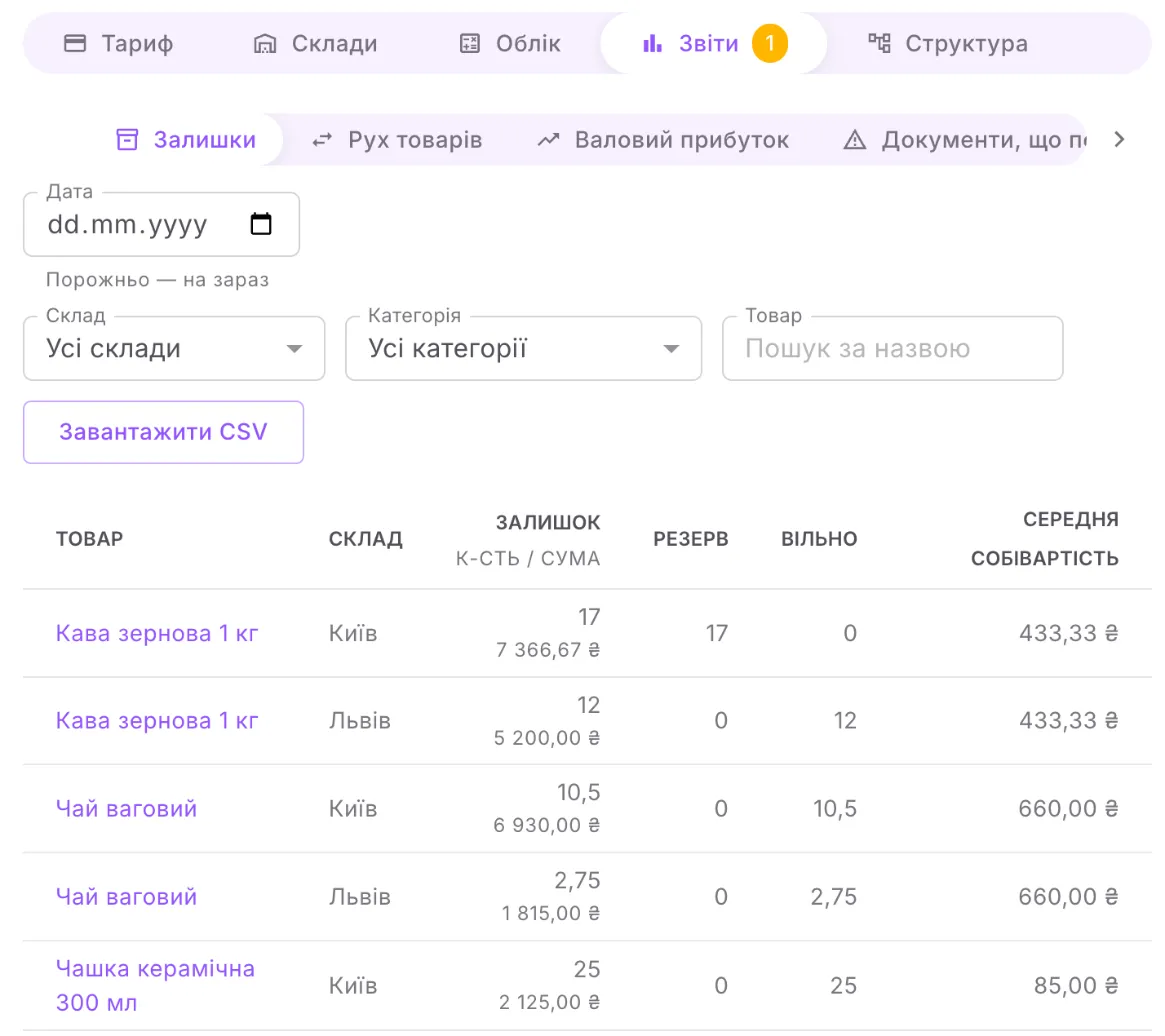
Stock on a date for each “product — warehouse” pair. If the Дата (Date) field is empty, the report is as of now; choose a date and the report is as of the end of that day.
| Column | What it means |
|---|---|
| Залишок (Stock) | the quantity and, below it, the value at average cost (the value is for administrators) |
| Резерв (Reserve), Вільно (Available) | only in the report as of now: how much is reserved for deals and how much is available |
| Середня собівартість (Average cost) | the cost of one unit of the product (for administrators) |
Below the table is Вартість залишків (Stock value): the total over all rows matching the filters (for administrators).
Stock movement
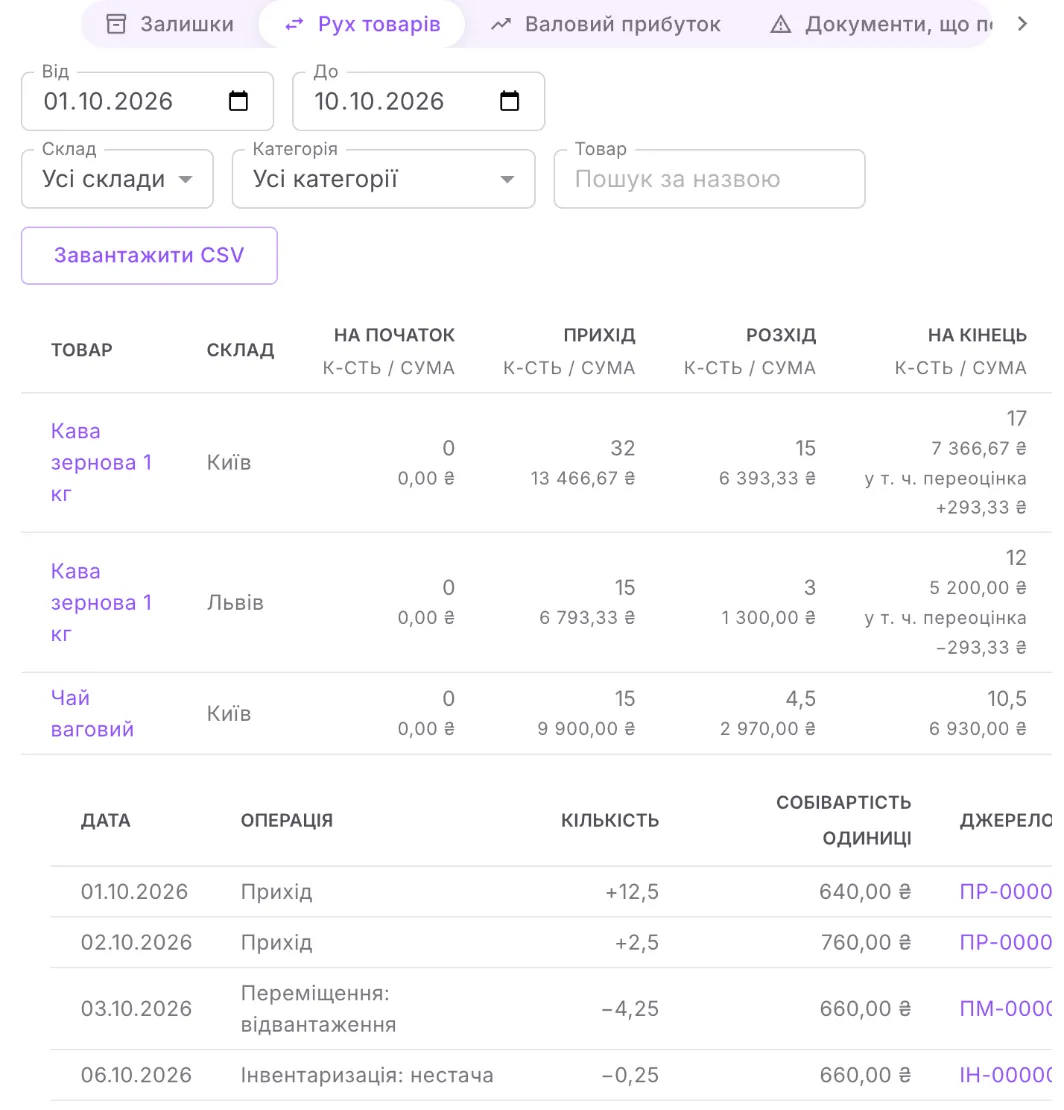
Section titled “Stock movement”For the period Від (From) — До (To), for each “product — warehouse” pair: На початок (Opening), Прихід (Received), Розхід (Issued), На кінець (Closing). Each column has two figures: the quantity and, below it, the amount at cost (amounts are for administrators; an employee sees only the quantity).
- Under the «На кінець» amount there is sometimes «у т. ч. переоцінка» (“incl. revaluation”). A warehouse gives out a product at the product’s shared average cost but received it at its own price — the difference is shown as revaluation. For the product as a whole, the revaluations of the warehouses balance each other out.
- The arrow button in a row expands the documents: date, operation, quantity, unit cost (for administrators) and source — a document or a deal. Up to 500 movements are shown; if there are more, narrow the period.
Gross profit
Section titled “Gross profit”A report for administrators. Sales by deal that were written off in the selected period. The Групувати (Group by) field: За угодами (By deal), За відповідальними (By responsible person — the person responsible for the deal) or За товарами (By product).
| Column | What it means |
|---|---|
| Виручка (Revenue) | the total of the deal’s product lines excluding VAT after discount |
| Собівартість (Cost) | the cost of the goods written off |
| Прибуток (Profit) | revenue minus cost |
| Маржа (Margin) | profit as a percentage of revenue |
| Продано (Sold), Повернено (Returned) | quantity — only when grouped by product |
Customer returns reduce both revenue and cost. The «Разом» (“Total”) row is the total over all rows matching the filters. Rows are sorted by profit, largest at the top.
Documents that need attention
Section titled “Documents that need attention”A report for administrators. It brings together four lists:
- Документи видалено в Uspacy, а їхній рух не скасовано (Documents deleted in Uspacy whose movement has not been cancelled) — stock still counts them. Next to each are Скасувати рух (Cancel movement) and Анулювати (Void). While such documents exist, a warning with a Відкрити (Open) button is shown above the tabs of the module screen, and a number is shown on the «Звіти» tab.
- Змінено після проведення — перепроведіть (Changed after posting — repost) — open the document and click Провести (Post).
- Інвентаризації потребують перепроведення (Stocktakes need reposting) — post the stocktake again.
- Товарів немає серед товарів каталогу, а залишок лишився (Products no longer in the catalog still have stock) — the product was deleted from the catalog or turned into a service. Such stock cannot be written off with a «Списання» (“Write-off”) document, so next to the product there is a Списати залишок (Write off stock) button: the module writes the stock off from all warehouses as of the current date. A product appears in the list after the next product check — by the following night at the latest.
If everything is fine, the report says «Усі проведені документи збігаються з обліком» (“All posted documents match the records”). See Stock documents for details.