
Cost and backdated changes
The module calculates cost itself — you do not need to enter it manually. Cost is needed for stock value, the «Рух товарів» (“Stock movement”) report and gross profit by deal.
Weighted average cost
Section titled “Weighted average cost”Each product has one average cost for all warehouses.
- A receipt from a supplier or a stock addition changes the average: new average = (stock value + receipt value) / (stock + receipt quantity). The receipt value is the quantity in the document line multiplied by the unit price; the price is taken excluding VAT and after discount.
- A write-off, a sale by deal and a stocktake shortage go out at the current average and do not change it.
- A transfer changes neither the average nor the product’s total stock.
- A stocktake surplus comes in at the current average.
- A customer return comes in at the cost at which the goods were written off in the deal.
- When a product’s stock has reached zero, the average is calculated anew from the next receipt.
Example. There are 20 kg of coffee in the warehouse at 400 ₴. Another 10 kg arrive at 460 ₴. The average becomes (20 × 400 + 10 × 460) / 30 = 420 ₴, and the following sales are written off at it.
Backdated documents
Section titled “Backdated documents”A document can be posted with a date in the past — for example, a receipt you forgot to enter. Then the module:
- checks that stock does not go negative anywhere after that date;
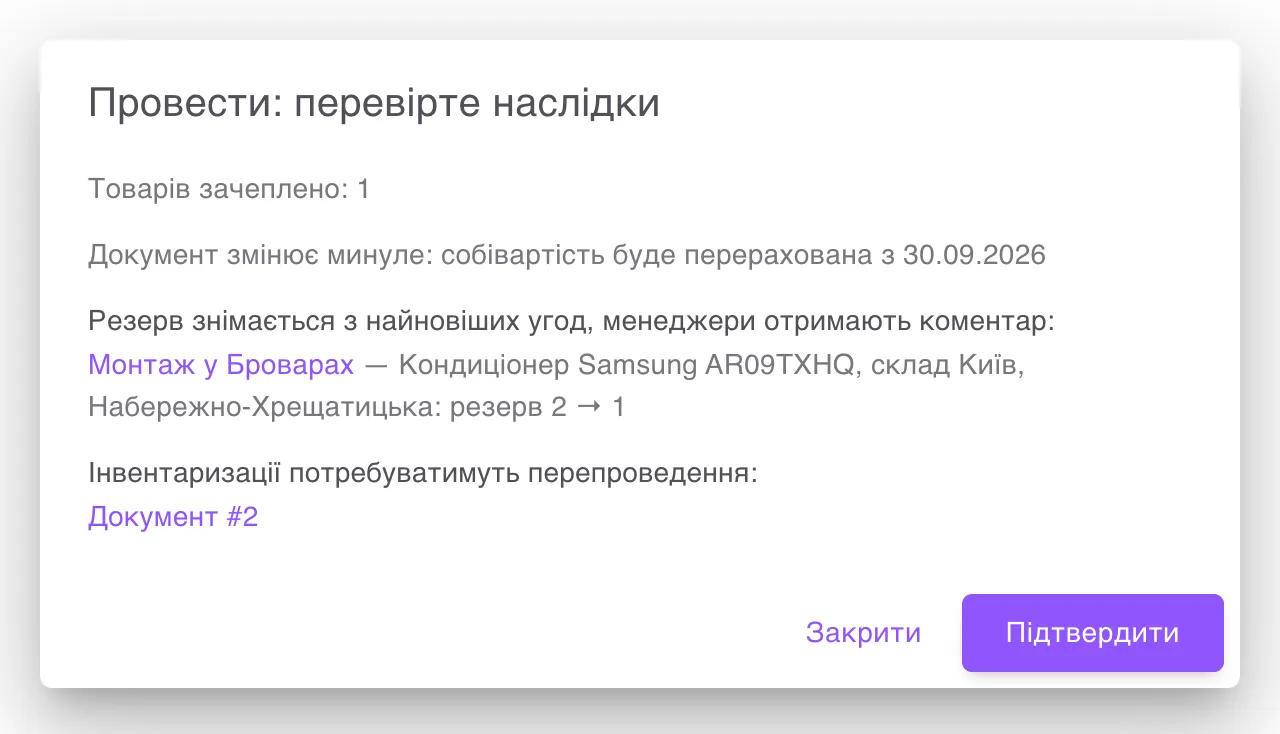
- first shows the «Провести: перевірте наслідки» (“Post: check the consequences”) window with the line «Документ змінює минуле: собівартість буде перерахована з …» (“The document changes the past: cost will be recalculated from …”) — the same goes for any cancellation;
- after confirmation, recalculates the product’s cost over the whole history: the cost of later write-offs and sales and the stock value change.
While the recalculation is running, reports say «Дані перераховуються: собівартість частини товарів ще оновлюється» (“Data is being recalculated: the cost of some products is still updating”), and the products are marked «Перераховується» (“Recalculating”). Usually it takes seconds. The recalculation does not change the documents themselves in Uspacy — cost amounts live only in the module’s records.
Stock never goes negative
Section titled “Stock never goes negative”The rule applies on any date and in each warehouse separately. So the module refuses if:
- cancelling a receipt in the past would leave later write-offs, transfers or sales without stock;
- a write-off or a transfer in the past would take stock that has since been sold;
- a deal at the write-off stage is short of stock — then nothing is written off.
The refusal names the product, the warehouse, how much is short and from which date, as well as the documents and deals that took the stock — with links. Correct the document or post the necessary receipt first.
A document in the past can reduce stock below the reserves already made. This is not forbidden: the window shows which deals the reserve will be released from (the newest ones), and the people responsible for them get the comment «Склад: резерв зменшено через зміну документа заднім числом» (“Warehouse: the reserve was reduced because of a backdated document change”).
Lock date
Section titled “Lock date”On the Облік (Accounting) tab you can set Дата заборони змін (Lock date) — for example, after closing a month. Documents dated earlier than this cannot be posted, cancelled or changed retroactively. The module replies «Документ зачіпає закритий період: дата заборони змін — …» (“The document affects a closed period: the lock date is …”). To correct such a document, the administrator can temporarily clear the field.
Recalculate manually
Section titled “Recalculate manually”If the reports seem inaccurate, the administrator can run Перерахувати собівартість (Recalculate cost) on the Структура (Structure) tab → Обслуговування (Maintenance). The module recalculates cost over the whole history of the products and records the recalculation in the log.