
Stock on the product card
Updated
The card of every product in the Uspacy catalog has a Stock tab: how much of the product is in each warehouse, how much of it is reserved for deals, how much is available, what its cost is and what has happened to the product recently.
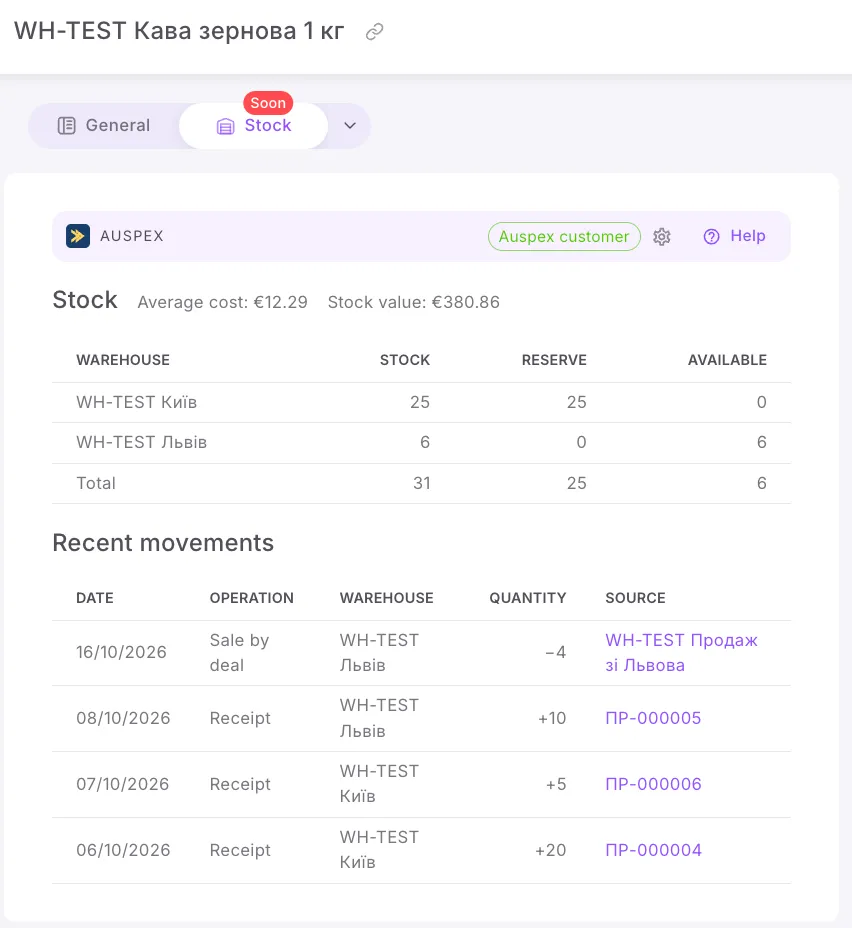
What is on the tab
Section titled “What is on the tab”At the top are the product’s Average cost — one for all warehouses — and Stock value — what the whole stock is worth at this cost. Only the portal owner and administrators see them. How cost is calculated is described in Cost.
The table by warehouse:
| Column | What it means |
|---|---|
| Warehouse | a warehouse that has the product or a reserve |
| Stock | how much of the product is in the warehouse now |
| Reserve | how much is reserved for deals |
| Available | how much can be reserved or written off |
| Total | the total row, if there are several warehouses |
If the product is not in any warehouse, the tab says «The product is not in any warehouse». A quantity can be fractional if the product is sold by weight or in other divisible units: the module counts to thousandths.
Recent movements
Section titled “Recent movements”The twenty most recent movements of the product: Date, Operation, Warehouse, Quantity (with a “+” or “−” sign) and Source — a link to the stock document or deal. The operations are named as follows:
- «Receipt», «Customer return», «Stocktake: surplus», «Transfer: in» — the product arrived at the warehouse;
- «Write-off», «Sale by deal», «Stocktake: shortage», «Transfer: out» — the product left the warehouse.
The full history for any period is shown in the «Stock movement» report.
Product fields in Uspacy
Section titled “Product fields in Uspacy”The module itself writes the total stock and total reserve across all warehouses to the Uspacy product, so managers see current numbers in the catalog and on the product card without opening the tab. The Stock field on the Uspacy product card (Залишок) shows available stock — quantity minus reserve. The numbers update within a minute after a document is posted or a reserve changes.
Only the module maintains these fields once a product appears in its records — in a document or in a deal reserve:
- a manual value will be overwritten, and a product with no receipts gets 0;
- to enter stock, post a «Receipt» document of the «Stock addition» type — see Quick start;
- it does not change products it has not touched yet, or services.
Every night the module reconciles the product fields with its records and corrects discrepancies.