
Reserve and write-off by deal
The module reserves goods when a deal reaches the reservation stage and writes them off from the warehouse at the write-off stage. The administrator sets the stages for each pipeline on the Облік (Accounting) tab — see Settings. The manager sees everything on the Резерв (Reserve) tab of the deal card.
The deal’s warehouse
Section titled “The deal’s warehouse”- Goods are reserved and written off from the warehouse specified in the deal’s Склад (Warehouse) field. At the reservation stage the field is required.
- If the field is empty, the module takes the default warehouse from the «Склади» (“Warehouses”) tab; it writes nothing to the deal itself. If no default warehouse is chosen either, no reserve is made and a comment arrives in the deal.
- Identical products from several lines of a deal are added together. Services are not reserved.
What happens at each stage
Section titled “What happens at each stage”| Where the deal is | What the module does |
|---|---|
| Before the reservation stage | there is no reserve; if there was one, it is released |
| From the reservation stage up to the write-off stage | reserves as much as needed, but no more than is available in the warehouse |
| The write-off stage and beyond | writes off all the deal’s goods as of the current date at the average cost |
| A reserve release stage, the lost stage, the deal is deleted | the reserve is released |
Write-off is all or nothing. If even one product is short, nothing is written off and a comment arrives in the deal. The deal waits: as soon as the stock arrives, the module writes it off itself and posts a comment about it. Do not write off such a deal with a separate «Списання» (“Write-off”) document — the goods would be written off twice. To cancel the automatic write-off, move the deal off the write-off stage.
A deal created directly at the write-off stage (for example, by import) is not written off by the module on its own: it reserves the goods and asks you to click Списати (Write off).
Moving a deal back to an earlier stage after the write-off does not change stock. Goods return to the warehouse only through a document — with the Оформити повернення (Create return) button.
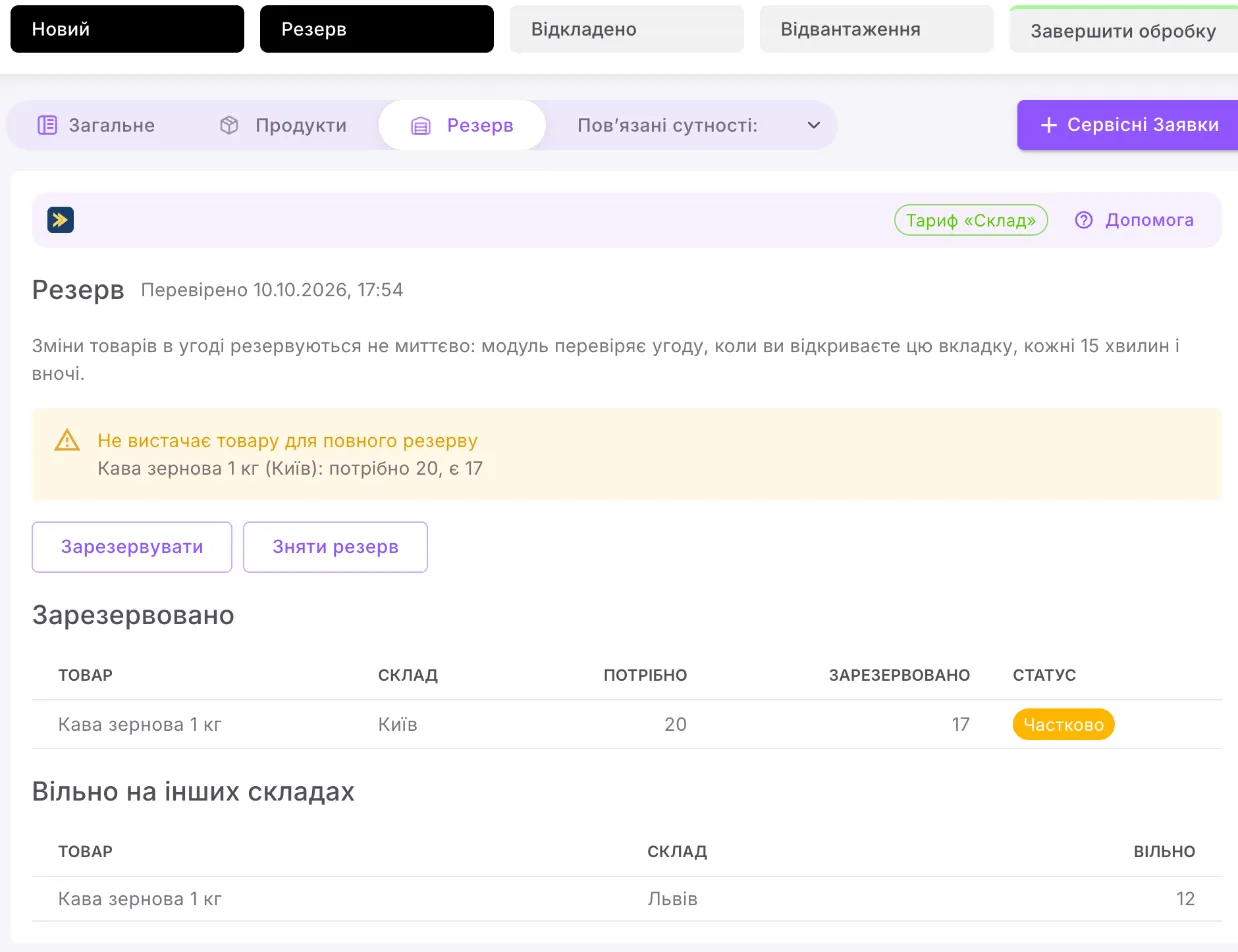
The «Резерв» tab
Section titled “The «Резерв» tab”At the top are «Перевірено» (“Checked”) with the time of the last check and the «Списано» (“Written off”) badge if the goods have already been written off.
- Зарезервовано (Reserved) — a table: product, warehouse, «Потрібно» (“Required”), «Зарезервовано» and the status: «Зарезервовано», «Частково» (“Partial”) or «Не вистачає» (“Short”).
- Списаний товар (Written-off goods) — what has been written off for the deal and how much has already been returned.
- Вільно на інших складах (Available in other warehouses) — where else there is available stock of the reserved products.
| Button | What it does |
|---|---|
| Зарезервувати (Reserve) | checks the deal now and brings the reserve in line with its products and stage |
| Зняти резерв (Release reserve) | releases the reserve. If the deal stays at a reservation stage, the next check (within 15 minutes) makes the reserve again |
| Списати | available only at the write-off stage, until the goods are written off: repeats the write-off |
| Оформити повернення | creates a return document — see below |
Changes to the products in a deal are not reserved instantly: the module checks the deal when you open the Резерв tab, every 15 minutes and at night. That is also when a partial reserve is topped up if stock has arrived. If you chose the warehouse in the card while the tab was open, the reserve appears by itself.
Comments in the deal
Section titled “Comments in the deal”The module does not comment on a successful reserve. When something is wrong, a comment mentioning the responsible person arrives in the deal feed. It starts with «Склад:» (“Warehouse:”) and ends with «Деталі — вкладка «Резерв».» (“Details — the «Резерв» tab.”):
| Comment | What it means |
|---|---|
| «Склад: в угоді не вказано склад, резерв не поставлено.» (“Warehouse: no warehouse is specified in the deal, no reserve was made.”) | fill in the «Склад» field |
| «Склад: не вистачає товару для резерву: Кава зернова (Основний склад): потрібно 20, є 17.» (“Warehouse: not enough stock to reserve: Coffee beans (Main warehouse): 20 required, 17 available.”) | what is available has been reserved |
| «Склад: списання не виконано — не вистачає товару: …» (“Warehouse: write-off not completed — not enough stock: …”) | the deal is waiting for stock and will be written off automatically |
| «Склад: товар за угодою списано автоматично — списання, яке раніше не вдалося, виконано.» (“Warehouse: the deal’s goods were written off automatically — the write-off that failed earlier has been completed.”) | stock arrived, the deal was written off |
| «Склад: угода на етапі списання, але товар не списано — натисніть «Списати».» (“Warehouse: the deal is at the write-off stage, but the goods have not been written off — click «Списати».”) | click Списати on the tab |
| «Склад: резерв зменшено через зміну документа заднім числом.» (“Warehouse: the reserve was reduced because of a backdated document change.”) | a document in the past took the stock; the reserve was released from the newest deals |
| «Склад: склад угоди не входить у тариф складського обліку — резерв на ньому не ставиться.» (“Warehouse: the deal’s warehouse is not covered by the inventory accounting plan — no reserve is made in it.”) | contact the portal administrator; a reserve made earlier in another warehouse stays |
| «Склад: списання не виконано — угода списується сьогоднішньою датою, а дата заборони змін — …» (“Warehouse: write-off not completed — the deal is written off as of today, and the lock date is …”) | the administrator changes the lock date; the deal is then written off automatically |
| «Склад: списання не виконано — ціни в угоді не в гривні…» (“Warehouse: write-off not completed — the prices in the deal are not in hryvnias…”) | enter the product prices in UAH; the deal is then written off automatically |
| «Склад: товари угоди змінено після списання — у складському обліку лишилося списане раніше.» (“Warehouse: the deal’s products were changed after the write-off — inventory accounting keeps what was written off earlier.”) | inventory accounting does not change: return the goods with the Оформити повернення button or write off more with a «Списання» document |
| «Склад: товар за угодою вже списано — зміна етапу не повертає його на склад.» (“Warehouse: the deal’s goods have already been written off — changing the stage does not return them to the warehouse.”) | the deal was moved back or to “Lost” (Провал) after the write-off; to return the goods, use Оформити повернення |
The module writes about the same problem once, not on every check. A deal without a responsible person gets the same comment without a mention. The Списати and Зняти резерв buttons work only for those who can edit the deal.
Customer returns
Section titled “Customer returns”- On the Резерв tab, click Оформити повернення. The button is there as long as the deal has goods that were written off and not yet returned.
- The module creates a document «Повернення за угодою «…»» (“Return for deal «…»”) in the «Прихід» (“Receipt”) pipeline: the receipt type «Повернення від покупця» (“Customer return”), the deal, the warehouse and the products not yet returned. A link to it is in the message.
- Open the document, leave in the lines only what is being returned, and post it.
You cannot return more than was written off for the deal. Goods return to the warehouse at the write-off cost, and in the «Валовий прибуток» (“Gross profit”) report a return reduces the deal’s revenue and cost. Clicking the button again before you have posted the return gives a link to the same document: «Документ повернення вже створено» (“The return document has already been created”).