
Warehouse & Inventory for Uspacy: overview
Updated
The app adds warehouses and inventory accounting to Uspacy: how much stock is in each warehouse, how much is already reserved for deals, and what it cost you. Receipts, transfers, write-offs and stocktakes are recorded as stock documents right in Uspacy, and goods are reserved and written off automatically when a deal reaches the right stage. The developer is Auspex Streamline.
What the app can do
Section titled “What the app can do”| Feature | Where it is in Uspacy | Learn more |
|---|---|---|
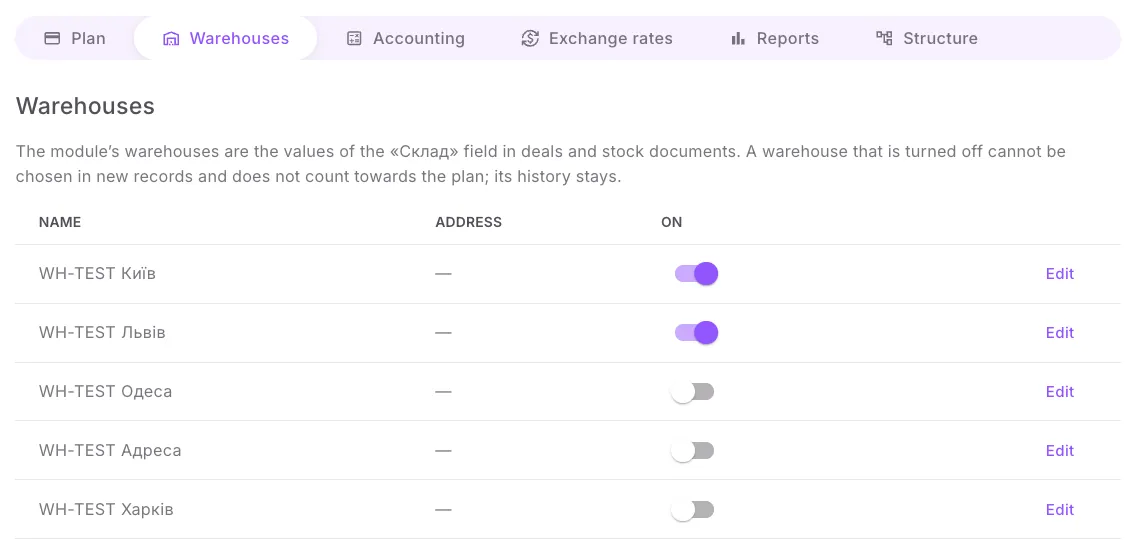
| Warehouses: add, rename, turn on or off | the module screen → Warehouses | Settings |
| Receipts, transfers, write-offs, stocktakes | Smart objects → Stock documents, the Posting tab in the card | Stock documents |
| Reserve and write-off by deal stage, returns | the Reserved tab in the deal card | Reserve and write-off by deal |
| Stock, reserve and cost of a product by warehouse | the Stock tab in the product card | Stock on the product card |
| Stock on a date, stock movement, gross profit | the module screen → Reports | Reports |
| Weighted average cost, backdated documents | automatic | Cost |
| Goods received note, write-off report and other forms | the stock document card | Printing documents |
| Plan, payment, subscription | the module screen → Plan | Plans and payment |
The module screen is the settings page of the Warehouse & Inventory app in the Marketplace (Крамниця застосунків). It has six tabs: Plan, Warehouses, Accounting, Exchange rates, Reports, Structure.
Where to start
Section titled “Where to start”- Quick start — installation, the structure in the portal, warehouses, turning accounting on and the first receipt, 15–20 minutes.
- Stock documents — how to post documents and what to do if the module refuses.
- Reserve and write-off by deal — what a manager sees in the deal card.
What to know from the start
Section titled “What to know from the start”- A document changes stock only after it is posted. A saved but unposted document counts for nothing.
- Stock never goes negative — on any date, in any warehouse. The module will not post a document or write off a deal if there is not enough stock, even if the document is dated in the past.
- The module maintains stock and reserve on Uspacy product cards. It overwrites manual changes to these fields. Opening stock is entered with a «Receipt» document of the «Stock addition» type.
- A warehouse is never deleted, only turned off: its history is kept.
- Dates are shown and calculated in the time zone of your Uspacy profile, as in Uspacy itself.
- Settings are for the portal owner and administrators. Other employees work in the card tabs and, on the module screen, see only the «Stock» and «Stock movement» reports, in quantities — without cost or profit.
- Interface language — Ukrainian or English, as in your Uspacy profile. The module creates the structure (fields, pipelines, stages) and the print templates in the language of the administrator who first clicked «Create missing»; comments in deals and documents are written in the same language. Portals that already have a structure stay Ukrainian. If the first payment was made before «Create missing» was clicked, the payment sets the portal language (Ukrainian or English, by the language of the administrator who paid). On a portal with a Ukrainian structure, the fields, pipelines and stages keep their Ukrainian names — for example, the «Склад» field and the «Прихід» pipeline — even when your interface is in English.
- The trial period is 14 days with all features. Special terms for Auspex customers — message us on Telegram.
Have a question? See Questions and answers and If something is not working.