
Plans and payment
Updated
After installation there is a 14-day trial period; after that, accounting runs on one of three plans. The plan depends only on the number of active warehouses. Payment and license status are on the Plan tab of the module screen; the portal owner and administrators see it.
Special terms for Auspex customers — message us on Telegram.
Trial period
Section titled “Trial period”- 14 days from the first installation, all features, no limit on the number of warehouses.
- Reinstalling the app neither extends the trial period nor starts it again.
- Three days before the end, «The inventory accounting trial period ends …» appears above the tabs.
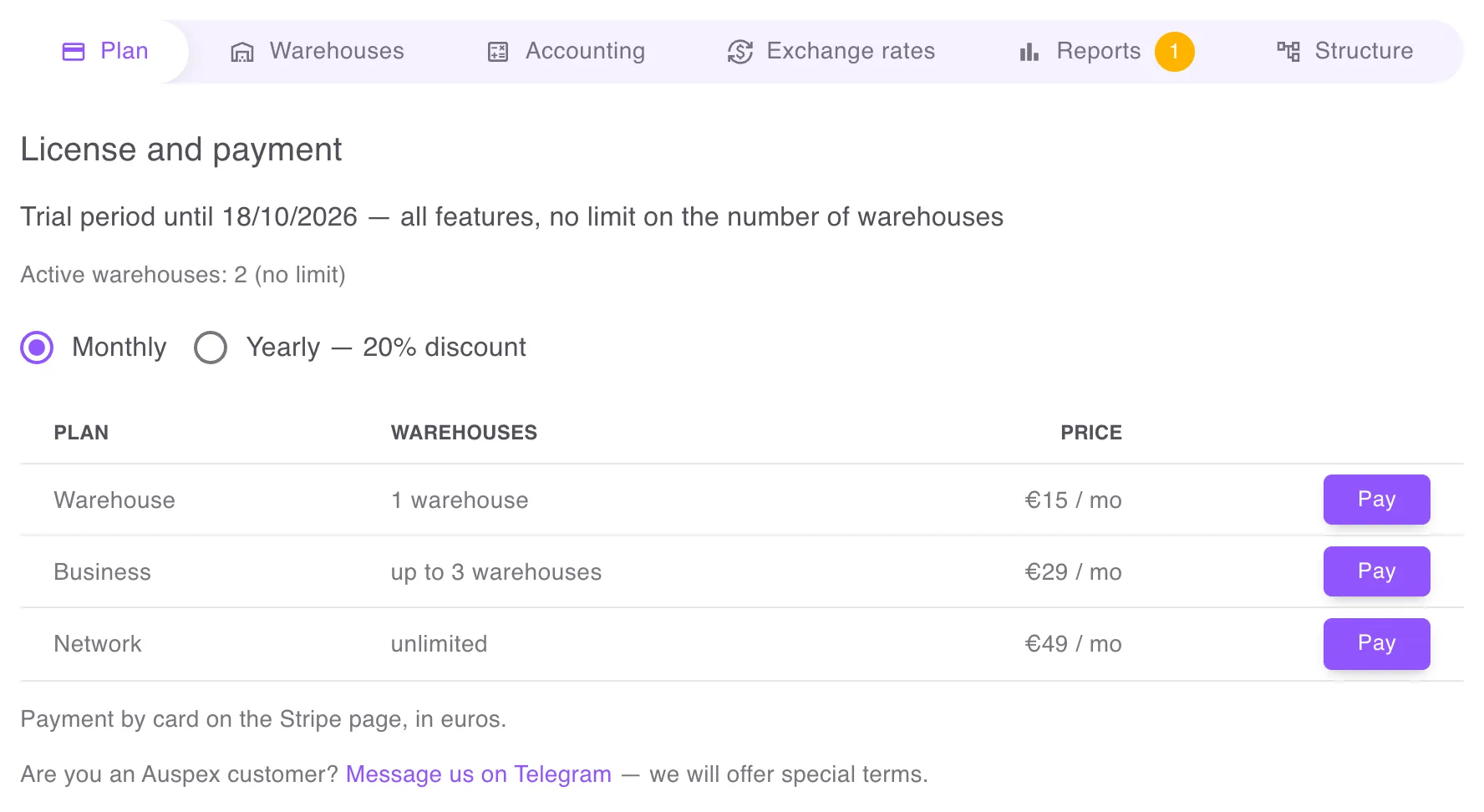
| Plan | Warehouses | Monthly | Yearly (20% discount) |
|---|---|---|---|
| Warehouse | 1 warehouse | 790 ₴ / month | 7 584 ₴ / year |
| Business | up to 3 warehouses | 1 490 ₴ / month | 14 304 ₴ / year |
| Network | unlimited | 2 490 ₴ / month | 23 904 ₴ / year |
If the module works in English on your portal (the structure was created in English, or an English-speaking administrator paid before the structure was created), the plans are paid in euros: €15 / €29 / €49 per month, €144 / €278 / €470 per year.
Only warehouses that are turned on are counted. A warehouse that is turned off is not included in the plan, and its history stays in the reports.
How to pay
Section titled “How to pay”- Open the Plan tab and choose the period: Monthly or Yearly — 20% discount.
- Click Pay in the row of the plan you need.
- The Stripe payment page opens. Payment is by card: in hryvnias for a Ukrainian portal, in euros for an English one.
- After payment you return to the same Uspacy page. Within a minute the tab shows, for example, «Plan «Warehouse», billed monthly. Paid until …».
Change the plan or card, or cancel
Section titled “Change the plan or card, or cancel”While the subscription is active, there is a Change plan button instead of the plan table. It opens the Stripe customer portal: there you can change the plan, update the card, download invoices and cancel the subscription.
A cancelled subscription runs until the end of the paid period — the tab says «The subscription is cancelled — accounting works until …».
If the payment failed
Section titled “If the payment failed”The badge in the header changes to «Payment failed», and the tab warns: «Payment failed — update the payment method with the «Change plan» button. After the last attempt, accounting will switch to view-only mode». While the payment service retries, accounting works as usual.
If the plan invoice remains unpaid — the payment service has stopped retrying, or the first payment could not be completed (for example, the bank did not receive confirmation) — the tab shows «There is an unpaid plan invoice» and the Pay invoice button instead of the plan table. It opens the Stripe customer portal: there you can pay the invoice or cancel the subscription. A new payment can be made once the invoice is paid or the subscription is cancelled.
View-only mode
Section titled “View-only mode”If the trial period has ended and there is no payment, the module switches to view-only mode («View only»):
- reports and card tabs work, and all data is kept;
- you cannot post documents, reserve or write off;
- new deals are not reserved, and a document moved to «Posted» is returned with a comment.
As soon as you pay for a plan, operations resume, and the module checks and reserves the open deals at reservation stages itself.
Warehouses over the plan
Section titled “Warehouses over the plan”On the «Warehouse» and «Business» plans you cannot turn on more warehouses than the plan allows: the module replies «On the «…» plan, active warehouses allowed: … — turn another warehouse off or change the plan …». A new warehouse over the plan is created turned off.
If there are more active warehouses than the plan covers (for example, after moving to a smaller plan), the plan covers the first ones by number, and the Plan tab warns:
Over the plan: … In these warehouses, receipts, stocktakes and transfers into them are not posted, and deals are not reserved or written off; you can still write goods off or transfer them to a warehouse covered by the plan. Turn off the extra warehouses on the «Warehouses» tab or change the plan.
Header badge
Section titled “Header badge”| Badge | What it means |
|---|---|
| «Trial until …» | the trial period is running |
| «Plan «…»» | the subscription is paid |
| «Payment failed» | the payment service is retrying |
| «View only» | the trial period or the paid period has ended |
| «Auspex customer» | Auspex special terms apply to the portal |