
Settings
Open the app → Settings. There are four tabs inside: Provider, Alpha names, Stop list and General.
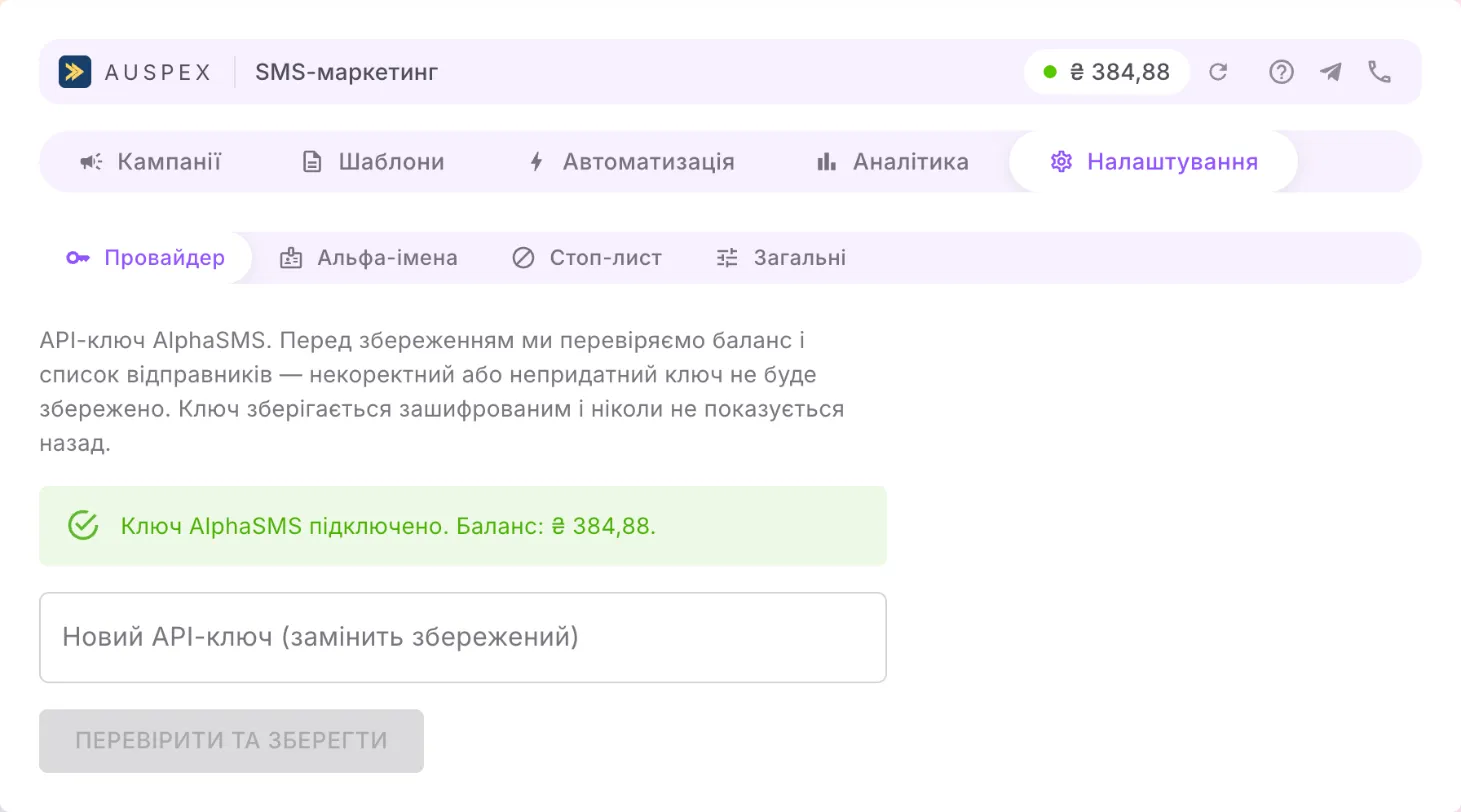
Provider
Section titled “Provider”This is where you connect your AlphaSMS account. Without it, nothing can be sent.
- Until a key is added, the tab shows step-by-step instructions. For details, see the Quick start.
- Once the key is connected, you see the balance of the account. The key itself is never shown again.
- To replace the key, paste the new one into the New API key field and click Validate and save. If the new key is wrong, the old one stays in place.
Only the portal owner or an administrator can change the key.
The balance is also always visible in the top bar of the app. The dot next to it shows the state: green means everything is fine, yellow means there is less than 100 UAH in the account and it is worth topping up, red means the key is not working.
Alpha names
Section titled “Alpha names”An alpha name is what the customer sees as the sender instead of a number, for example your company name.
- Names are created and approved in your AlphaSMS account, not in the app.
- The Refresh from AlphaSMS button pulls in the current list.
- The Status column shows whether AlphaSMS has verified the name. You can send only from verified names.
- In the Channel column you specify where the name is allowed: SMS and Viber, SMS only or Viber only. AlphaSMS does not report which channel a name is registered for, so you specify it yourself: a name that is not connected to Viber will not work for Viber messages.
Stop list
Section titled “Stop list”Numbers on the stop list receive no messages at all — not from the card, not from a campaign, not automatically.
- Add — one number.
- Bulk add — a list: one number per line, or separated by commas or semicolons. After the import you see how many were added, how many were already on the list and how many were rejected as invalid.
- Search — find a number; the cross next to a number removes it from the stop list.
A customer can also unsubscribe on their own: if they reply to a Viber message with СТОП, Відписатися, STOP or UNSUBSCRIBE, their number is added to the stop list automatically.
General
Section titled “General”| Setting | What it does |
|---|---|
| Default channel | which channel is preselected in the send form |
| SMS sender, Viber sender | the default alpha names — for the card and for rules where no sender is set |
| Timezone | the time zone used for quiet hours and for days in analytics; a zone name, for example Europe/Kyiv |
| Cooldown between automatic messages | the same record will not get another automatic message for the same stage until this much time has passed; no more than 30 days. A rule can set its own cooldown |
| Quiet hours | the window when automatic messages are not sent; they go out as soon as it ends |
| When a variable is missing | what to insert when the field in the record is empty: Remove it, Replace with a dash or Keep the {placeholder} |
| Transliterate by default | the “Transliterate” switch in the card starts switched on |
| Allow the AI assistant | turns the AI editor on or off for the whole portal |
After making changes, click Save.
About quiet hours
Section titled “About quiet hours”- They apply only to automatic messages. They do not restrict campaigns or sending from the card.
- Both bounds, “From” and “To”, are required. The window can cross midnight, for example from 21:00 to 09:00.
- Clear — turn quiet hours off.
- Transliteration by default applies only to the card: campaigns and automatic messages send the template text as is.