
Automatic messages
An auto-send rule sends a message on its own when a deal or lead moves to the chosen pipeline stage: “Paid” — a thank-you, “Shipped” — the waybill number, “Booking confirmed” — a reminder.
Open the app → Automation.
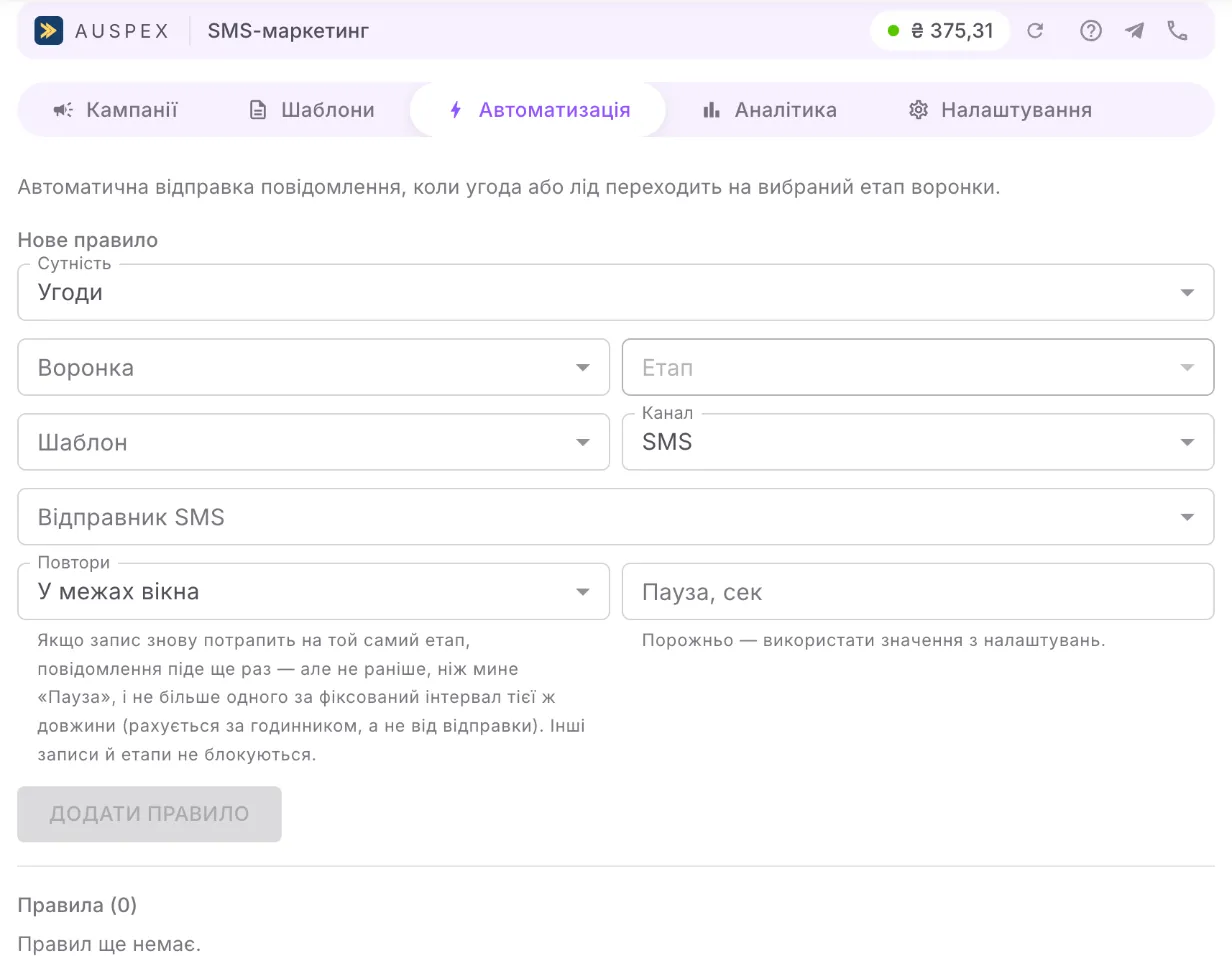
Create a rule
Section titled “Create a rule”- In the New rule block, fill in the fields:
| Field | What to enter |
|---|---|
| Entity | Deals or Leads |
| Funnel and Stage | the stage to send on |
| Template | the message text; templates that fit the chosen entity are offered |
| Channel | SMS, Viber or Cascade |
| Sender | the alpha name; “Default” takes it from the template or from the settings |
| Repeats | what to do if the record enters this stage again |
| Cooldown, s | the minimum time between messages to one record; empty means the value from the settings |
- Click Add rule.
One rule per stage. A new rule is enabled right away; the exception is the first minutes after the app is installed, covered below.
Repeats
Section titled “Repeats”- Within a window (default) — if the record returns to the same stage, the message is sent again, but not before the “Cooldown” has passed. This protects you when a manager drags a deal back and forth.
- Once, forever — each deal or lead gets the message for this stage only once, even if it returns to the stage a month later.
When a message is sent and when it is not
Section titled “When a message is sent and when it is not”A message is sent if the record has a phone number (for a deal, in the linked contact), the number is not on the stop list, the rule’s template has not been deleted and there is a verified sender.
If something is missing, the message is simply not sent. The rule stays enabled and will fire for the next record.
Quiet hours
Section titled “Quiet hours”To avoid waking customers at night, set Quiet hours in Settings. An event that happens during this window is not lost: the message goes out as soon as quiet hours end.
Disable or delete
Section titled “Disable or delete”- The Enabled / Disabled switch — stop the rule temporarily without deleting it.
- Delete — remove it for good.
Good to know
Section titled “Good to know”- The first minutes after installation. After the app is installed or the first rule for deals (or leads) is created, Uspacy does not start passing events right away: the delay is up to 5–10 minutes. Stage changes during this time do not produce a message. Later rules for the same entity work right away.
- Only a move between stages. A rule fires when a record moves to the stage. If a deal or a lead is created directly in that stage (by hand, from a form, by import), no message is sent — so a rule on the first stage of a pipeline does not catch new records.
- The stage change must be real. Editing a deal’s title or amount without changing the stage does not trigger the rule.
- Automatic messages are visible in the card history next to those sent manually.
- If a rule could not be saved because of a subscription error on the Uspacy side, the change was not saved. Try again in a minute.